Stop Reading, Start Listening: A Deep Dive into WithAudio
We’ve all been there: staring at a screen for hours, eyes straining under the glare of a dozen browser tabs, trying to digest complex documentation, long-form research papers, or the latest industry reports. As indie makers and solopreneurs, our time is our most valuable currency. When you’re building a business, you don't always have the luxury of sitting still to read every single word. Sometimes, you need to be mobile, or you need to multitask, or you just need a break from staring at text.
That’s where WithAudio enters the picture. It’s a desktop-first solution designed for those of us who prefer to consume content through our ears rather than just our eyes, without the baggage of recurring monthly subscriptions.
What is WithAudio?
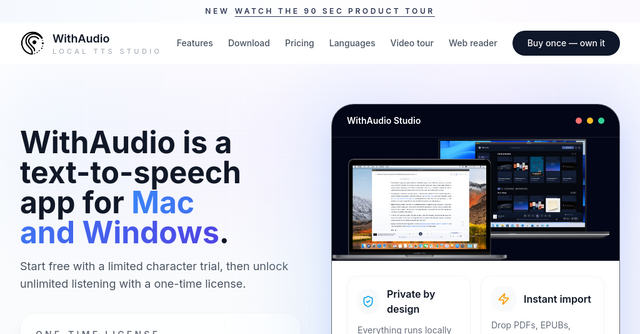
At its core, WithAudio is a premium desktop text-to-speech (TTS) reader available for both macOS and Windows. While it falls under our "Others" category here at IndieProducts.io, it’s a productivity powerhouse.
Unlike most modern TTS tools that rely on cloud-based APIs—which often come with monthly fees, privacy concerns, and latency issues—WithAudio runs 100% locally on your machine. There is no cloud processing, no external API calls, and no subscription fatigue. You buy it once, and it’s yours.
Why Local AI Matters for Indie Makers
Privacy and performance are the two pillars of a solid workspace. Because WithAudio uses local AI-powered speech synthesis and document parsing, your data never leaves your computer. Whether you are reviewing sensitive contracts, proprietary research, or private project notes, you can rest easy knowing your documents aren't being uploaded to a third-party server for processing.
Furthermore, because everything happens on your local hardware, you don’t need an active internet connection to transform your documents into audio. Whether you're on a flight, in a remote workspace, or just dealing with spotty Wi-Fi, your workflow remains uninterrupted.
Key Features That Change the Game
Synchronized Text Highlighting
One of the biggest issues with standard TTS tools is losing your place. WithAudio solves this by providing synchronized text highlighting. As the AI reads, the app highlights the text on your screen in real-time. This is a massive focus booster; it keeps your brain engaged and helps you retain information much better than audio alone. It’s perfect for skimming long articles or proofreading your own writing.
Global Text Capture
This is arguably the most "indie-maker friendly" feature. WithAudio includes a global text capture function. You can be inside any application—your code editor, a messaging app, or a web browser—select any text, hit a hotkey, and instantly convert it to speech. You aren't limited to just importing files; you can turn your entire desktop into an audiobook reader.
Versatile File Support
The app handles the formats we use every day. Whether you’re importing PDFs, EPUBs, web pages, or simple plain text files, WithAudio parses them cleanly. It’s a fantastic way to turn technical documentation into a podcast-like experience you can listen to while commuting or doing chores.
Export to MP3 and M4A
Sometimes you need to take that content with you on the go. WithAudio allows you to export your documents to MP3 or M4A files. You can drop these onto your phone or a dedicated music player and listen whenever you have a moment, effectively turning your "reading list" into a personal library of spoken-word content.
Browser Integration
For those who do the bulk of their research online, the included Chrome extension is a lifesaver. It bridges the gap between your browser and the desktop app, making it seamless to move from finding an interesting article to listening to it via the high-quality local engine.
Real-World Scenarios: How to Use It
If you’re wondering where this fits into your daily routine, consider these scenarios:
- The Commuter: Export your industry newsletters or long-form blog posts to MP3 files in the morning. Listen to them on your way to the office or the coworking space. You turn dead time into professional development.
- The Proofreader: If you’re writing documentation or marketing copy, have WithAudio read it back to you. Hearing your own words spoken by an AI is one of the fastest ways to catch awkward phrasing, grammatical errors, or tone inconsistencies that your eyes might skip over.
- The Researcher: When you’re deep into a competitive analysis, open those massive PDFs in the app. Use the synchronized highlighting to follow along with the audio, allowing you to absorb complex data faster without the mental fatigue of manual reading.
- The Multitasker: If you’re a solopreneur handling design, coding, and admin, you can keep your project notes open and have the app read them while you perform repetitive manual tasks.
Why Choose a One-Time Purchase?
In an era where every single piece of software is shifting to a "SaaS-everything" model, the recurring billing cycle can become a nightmare for indie makers. A $10/month subscription for a TTS tool might seem small, but it adds up to $120 a year—and that’s just for one tool.
By choosing WithAudio, you are opting for a one-time payment model. You pay once, you own the software, and you don’t have to worry about your access being revoked if you decide to trim your software budget for a month. It’s a refreshing change of pace and honors the spirit of the indie community: building sustainable, transparent tools that respect the user.
Final Thoughts
We’re constantly on the lookout for tools that help us reclaim our time and focus. WithAudio is an excellent addition to any indie maker's toolkit because it doesn't try to overcomplicate the process. It does one thing—transforming text into speech—and it does it exceptionally well, locally and privately.
If you’re tired of the "read it later" pile that keeps growing, or if you simply find that your brain processes information better through audio, this is a tool worth testing. It’s efficient, privacy-focused, and respects your budget with its no-subscription pricing.
Ready to clear your reading list? Head over to the WithAudio website to see it in action and grab your copy today. Your eyes (and your productivity) will thank you.