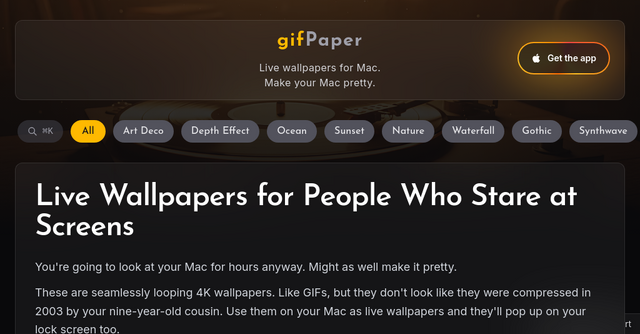
Transform Your Mac Workflow with gifPaper: The Ultimate Desktop Upgrade
We spend the majority of our waking hours staring at a glowing rectangle. Whether you’re a developer squashing bugs, a designer iterating on a UI, or a solopreneur managing your SaaS business, your desktop is your digital home. Yet, for most of us, that home is static, boring, and frankly, a bit uninspiring.
Apple provides beautiful static images, but they don't quite capture the "vibe" that helps us get into a flow state. If you’ve ever found yourself wishing your Mac felt less like a work machine and more like a curated, immersive environment, you aren't alone.
Enter gifPaper. It’s not just another desktop customization tool; it’s a way to reclaim your digital workspace by turning your lock screen, desktop, and screen saver into a living, breathing canvas.
What is gifPaper?
At its core, gifPaper is a specialized SaaS tool designed to bypass Apple’s restrictive wallpaper settings. While macOS is known for its polished aesthetic, it doesn't natively support high-quality, seamless, animated backgrounds that won't destroy your battery life or performance.
The developers behind gifPaper recognized that "GIFs" have a bad reputation—they’re usually low-resolution, choppy, and look like they were compressed in the early 2000s. They set out to fix that by delivering 150 handcrafted, 4K-resolution, seamlessly looping live wallpapers. From lofi study scenes that help you focus to neon-drenched cyberpunk cityscapes that inspire your next big project, this tool is built for the modern professional who cares about their environment.
Why Your Mac Needs a Vibe Shift
As indie makers, we often focus on the productivity side of our tools. We talk about keyboard shortcuts, project management software, and automation scripts. But environment design is a silent partner in productivity.
When you’re staring at a screen for ten hours a day, the visual stimuli around your windows matter. A jarring, bright, or chaotic desktop can contribute to digital fatigue. Conversely, a calming, looping visual—like a rainy window in a cozy cafe or a slow-moving space nebula—can provide a subtle, non-distracting background that makes the "stare time" significantly more enjoyable.
Native-Level Performance
The biggest concern with using animated wallpapers is usually performance. Nobody wants a "pretty" desktop that causes their MacBook fans to spin at maximum velocity or drains their battery in an hour.
gifPaper is built using Apple’s own proprietary Aerial format. This is the secret sauce. By leveraging native-level technology, the software ensures:
- Smoothness: The loops are seamless, meaning you won’t catch that annoying jump-cut that plagues standard animated wallpapers.
- Battery Efficiency: The playback is optimized to reduce battery drain, allowing you to use it throughout your workday without anxiety.
- Intelligent Slowdown: Just like Apple’s default screensavers, gifPaper intelligently slows down or pauses when you unlock your machine or shift focus, ensuring your system resources are prioritized for your actual work.
A Massive Library of Aesthetic Choices
One of the standout features of gifPaper is the sheer variety of the library. It isn't just a collection of random clips; it’s a curated gallery of high-end visuals. Whether you’re a fan of "Dark Academia," "Synthwave," or "Japanese Victorian" aesthetics, there is something here for you.
Categorized for Your Mood
- The Lofi Collection: Perfect for deep work sessions. The "Lofi Study Desk" or "Lofi Coffee Shop" scenes are classics for a reason—they provide a sense of place that helps block out the noise of a busy day.
- Space and Sci-Fi: For the developers building the future, the space visuals—ranging from Mars orbits to cyberpunk alleyways—provide a sense of scale and wonder.
- Cozy and Natural: Sometimes you just need a fire. The various fireplace options (Scandinavian Hygge, Medieval Castle, Library Study) offer a warmth that can make a sterile home office feel significantly more inviting.
- Greek God Workouts: A unique addition for those who need a little motivation. These looping visuals of Olympic-style training can provide a subtle nudge to step away from the desk and hit the gym.
How to Get Started
The experience of choosing your wallpaper is almost as satisfying as using it. You can browse the entire collection on the gifPaper website before installing the app. The site allows you to preview the visuals in a full-screen mode, giving you an accurate feel for how they will look on your specific monitor setup.
Many of the scenes even come with ambient music. If you’re working in a quiet space, simply letting the site run in the background can act as a meditation tool, helping you center yourself before you dive into that next sprint or client email.
Practical Use Cases for Indie Makers
- The "Focus" Desktop: Use the "Rainy Window" or "Forest Path" loops to create a calming, low-distraction environment for deep coding or writing sessions.
- The "Inspiration" Desktop: Use the "Cyberpunk" or "Art Deco" collections to keep your creative juices flowing when you’re stuck on a UI/UX design problem.
- The "Screen Saver" Power Move: Even if you don't want a live wallpaper on your active desktop, setting these as your screen saver creates a professional, high-end look for your Mac whenever you step away for a coffee.
Final Thoughts: Is It Worth It?
For indie makers and SaaS enthusiasts, our computers are our primary tools of production. We spend thousands of dollars on high-end hardware, ergonomic chairs, and mechanical keyboards—why leave the digital interface to chance?
gifPaper is a rare tool that bridges the gap between "aesthetic customization" and "high-performance utility." It doesn't bloat your system; it enhances the environment you spend your life in. It turns the mundane act of opening your laptop into a moment of intentionality.
If you’re tired of the same old static wallpapers and want to bring a bit of personality and zen to your Mac, check out the collection at gifPaper.com. It’s a small investment in your own daily experience, and honestly, you deserve a desktop that looks as good as the work you’re building.
Ready to upgrade your workspace? Head over to gifPaper today, find the vibe that matches your workflow, and see how a little bit of movement can make a world of difference.