Stop Guessing, Start Analyzing: How Tradepal Uses AI to Simplify Stock Charting
You’re staring at a candlestick chart, three different technical indicators are giving you conflicting signals, and that nagging feeling of "am I missing something?" is starting to creep in. We’ve all been there. Active trading is mentally exhausting, and the gap between spotting a potential setup and having the confidence to execute it is where most traders lose their edge—and their capital.
If you’re a trader or an indie investor looking for a way to remove the guesswork from your workflow, Tradepal might just be the "second set of eyes" you’ve been searching for.
What is Tradepal?
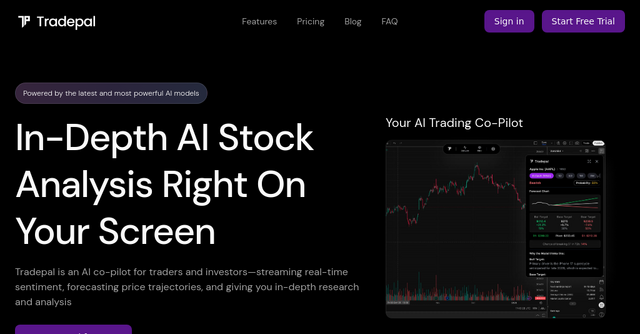
Tradepal is a specialized desktop app designed to act as an AI-powered co-pilot for your trading journey. Unlike complex trading platforms that try to do everything—from executing trades to managing portfolios—Tradepal focuses on one thing: providing objective, AI-driven analysis of stock charts.
Whether you are a discretionary trader who relies on price action or a systematic trader looking for an extra layer of validation, this tool is built to integrate into your existing setup. It doesn’t matter if you prefer TradingView, ThinkOrSwim, or a browser-based charting tool; Tradepal works by analyzing screenshots of your charts to deliver bullish, bearish, or neutral insights, complete with price targets and confidence scores.
Why Traders Need an AI Co-Pilot
The problem with manual chart analysis is that it’s inherently tied to our psychology. We see what we want to see. If you’re bullish on a stock, your brain tends to ignore bearish divergence.
Tradepal solves this by stripping away the emotional bias. By using advanced AI models to scan for technical patterns, support and resistance levels, and momentum shifts, it provides a cold, hard look at the data. It’s not a trading bot that executes orders on your behalf—it’s an analytical layer that helps you validate your own thesis before you put your money on the line.
Key Features That Change the Workflow
1. Universal Chart Compatibility
One of the most impressive aspects of this desktop app is its platform-agnostic nature. Because it processes visual data (screenshots), it doesn't need to be integrated into your broker’s API. You simply have your chart open, hit the "Analyze" button, and let the AI do the heavy lifting. This is a massive win for traders who have spent years building a specific layout on their favorite platform and don't want to move to a new, clunky interface.
2. Bull, Base, and Bear Scenarios
Instead of giving you a single, vague prediction, Tradepal generates structured scenarios. It breaks down the potential for a bullish move, a consolidation phase (base), or a bearish breakdown. By providing price targets and confidence scores for each, it gives you a range of outcomes. This helps you build a more robust risk management strategy, allowing you to prepare for "what if" scenarios rather than just hoping for "what I want."
3. Sentiment and News Integration
Technical analysis doesn't happen in a vacuum. Tradepal tracks market mood across professional trader sources and financial news. By seeing when crowd conviction is building, you can identify potential breakouts before they fully manifest in the price action. It’s like having a sentiment scanner running in the background while you focus on the technicals.
4. Real-Time AI Forecasts
The platform delivers intraday forecasts for volatility, ranges, and reversals. The AI ensemble updates in real-time, meaning you get a heads-up on risk before it shows up as a significant move on your screen. This "early warning system" is particularly useful for active traders who need to react quickly to market shifts.
Practical Use Cases: How to Integrate Tradepal
To understand how this fits into a daily routine, let’s look at a couple of scenarios:
The Swing Trader’s Validation: You’ve spotted a potential breakout on a tech stock. Normally, you’d spend 20 minutes double-checking moving averages and RSI. With Tradepal, you just capture the chart. Within seconds, the app confirms if the technical patterns align with the current market sentiment. If the AI’s confidence score for a bullish move is low, you might decide to hold off or reduce your position size, potentially saving you from a false breakout.
The Intraday Scalper’s Speed: When you’re scalping, every second counts. You don’t have time to cross-reference multiple news feeds and sentiment trackers. By keeping the desktop app open on a second monitor, you get a constant stream of "at-a-glance" analysis. You can quickly see if the broader market sentiment supports your current scalp, allowing you to trade with more conviction and less hesitation.
Why This Tool Stands Out for Indie Makers and Traders
As an indie product, Tradepal is refreshingly focused. It doesn't try to be a brokerage, an educational academy, or a social network. It is a utility tool. For solopreneurs and independent investors, time is the most valuable resource. We don’t have institutional research departments to hand us reports.
By leveraging Tradepal, you are essentially outsourcing the tedious, repetitive part of chart analysis to an AI that never gets tired, never gets greedy, and never gets fearful. It’s an efficient way to scale your decision-making process without needing to hire an analyst.
Final Thoughts: Should You Add It to Your Stack?
If you are a trader who has ever felt like your analysis is missing that "extra edge," or if you find yourself constantly second-guessing your setups, Tradepal is worth a look.
The barrier to entry is low—you can download the app for macOS or Windows or simply use the web version to upload screenshots—and the utility is immediate. It’s built for traders who want to stay in control of their own trades while utilizing the latest advancements in AI to sharpen their perspective.
Stop trading in a vacuum. Give your workflow an upgrade and start making decisions backed by data-driven insights.
Ready to see what the AI sees? Try Tradepal for free today and start trading with more confidence.