Why TimerJet Is the Last Online Timer You’ll Ever Need to Bookmark
We’ve all been there: you’re deep into a sprint, trying to hit a deadline, and you need a quick way to track your time. You open a new tab, search for "online timer," and are immediately met with clunky, ad-heavy websites that require you to sign up for an account just to track ten minutes of work. It’s a friction-filled experience that kills your flow before you even start.
For indie makers and solopreneurs, tools shouldn’t be a distraction—they should be invisible assistants. That’s exactly where TimerJet comes in. It is a clean, no-nonsense website that offers an online timer, alarm clock, and stopwatch without the clutter, the sign-up forms, or the paywalls.
What is TimerJet?
TimerJet is a browser-based utility designed for those who value speed and simplicity. It’s a dedicated website that functions as a high-performance timer, alarm, or stopwatch. Because it lives entirely in your browser, there is nothing to download, install, or configure.
Whether you are a developer managing a Pomodoro session, a teacher timing a classroom activity, or a solopreneur trying to keep a meeting on track, TimerJet provides a frictionless experience that respects your time. It’s built for anyone who needs to manage their day without the overhead of complex project management software.
Why Indie Makers Will Love This Tool
As someone who spends most of their day in a browser, I’ve become increasingly picky about the tools I use. I want things that load instantly, look good, and don't try to harvest my data. TimerJet hits all those marks. Here is why this tool has earned a permanent spot in my browser bookmarks.
1. Zero Friction, Zero Sign-ups
The best tools are the ones you don’t have to "set up." With TimerJet, you don’t need to create an account or provide an email address. You just open the URL, set your time, and go. It’s the antithesis of the modern "SaaS bloat" where every simple utility demands a login.
2. Deep Customization for Any Environment
Not all timers are created equal. Sometimes you need a subtle chime for deep work, and other times you need massive, high-contrast numbers for a team meeting or a group workout.
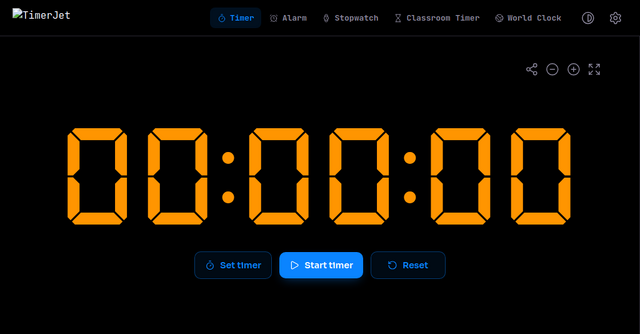
TimerJet allows you to adjust the accent color, font, and digit size. The full-screen mode is particularly impressive—it makes the timer readable from across a room, which makes it perfect for projectors, shared office screens, or even just keeping your focus from a distance while you’re away from your keyboard.
3. Smart Bookmarking
One of the most clever features is the ability to bookmark specific durations. If you find yourself constantly using a 25-minute Pomodoro timer or a 10-minute break timer, you don’t have to reset it every time. You can navigate to the specific page for that duration and bookmark it. The next time you need it, one click and you’re ready to roll.
Practical Use Cases
You might be thinking, "It’s just a timer, what can I really do with it?" You’d be surprised how often a high-quality, reliable timer can improve your workflow.
- The Pomodoro Technique: Use the 25-minute preset to maintain peak focus. Bookmark the 5-minute page for your short breaks. It keeps you honest and prevents burnout.
- Classrooms and Presentations: If you’re hosting a workshop or a stand-up meeting, put TimerJet on the main screen. The oversized digits ensure everyone in the room knows exactly how much time is left, reducing the need for constant "how much time do we have?" interruptions.
- Deep Work Sprints: Sometimes we just need to commit to 60 minutes of uninterrupted coding or writing. Having a visual, full-screen countdown acts as a psychological anchor, helping you stay in the "zone."
- Fitness and Cooking: Beyond the office, this is an excellent tool for HIIT workouts or keeping track of dinner in the kitchen. Since it works on mobile browsers too, you can carry your timer with you wherever you go.
Features at a Glance
- Browser-Based: No downloads or installations required.
- Highly Configurable: Customize fonts, colors, and digit sizes to suit your workspace aesthetic.
- Multiple Modes: Seamlessly switch between a countdown timer, an alarm clock, and a stopwatch with lap timing.
- Embeddable: If you’re a developer or a blogger, you can embed timers directly into your own websites.
- Offline Capability: Once the page has loaded, it works fully offline—perfect for those times when your internet connection is spotty.
- Sound Previews: You can preview alert sounds before you start your timer, so you aren't surprised by a jarring noise when the clock hits zero.
How to Get Started
Using TimerJet is as straightforward as it gets. Simply head over to their website to start your first countdown.
- Set the duration: Use the hours, minutes, and seconds input to define your target time.
- Customize: Check out the sidebar to adjust your font, color, and alert sounds.
- Start: Hit "Start" and let the timer run.
- Bookmark: If you love the duration you just set, save it as a bookmark in your browser for one-click access later.
Final Thoughts
In an era where every tool wants to be a platform, it’s refreshing to find a website that just does one thing and does it perfectly. TimerJet isn’t trying to manage your entire life; it’s just trying to help you manage your time.
If you are an indie maker looking for a clean, reliable, and free way to track your productivity, I highly recommend giving it a try. It’s a rare example of a utility that feels like it was built by someone who actually cares about the user experience.
Go check out TimerJet today and streamline your workflow. Your future, more focused self will thank you.