Stop Scrolling, Start Learning: How to Use AI to Master Reddit Threads
We’ve all been there. You find a Reddit thread that looks like a goldmine of information—maybe a debate on the latest marketing frameworks, a deep dive into technical debt, or a massive "ask me anything" session from a founder you admire. You start reading, but three hours later, you’re still scrolling through thousands of comments, your eyes are glazing over, and you’ve lost the actual signal in the noise.
For indie makers and solopreneurs, time is our most valuable currency. We use platforms like Reddit to validate ideas, research competitors, and find potential customers, but the platform’s design is built to keep you scrolling, not to help you extract insights efficiently.
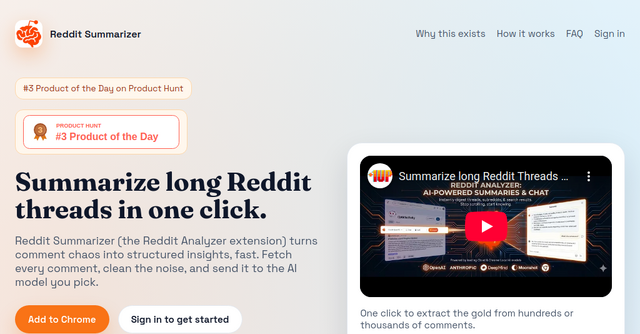
That is exactly why I’ve been keeping a close eye on the Reddit Post Summarizer. It’s a powerful browser extension that changes the way we interact with Reddit, turning comment chaos into actionable data in seconds.
Why Reddit is a Nightmare for Research (And How to Bypass It)
If you’ve ever tried to feed a massive Reddit thread into ChatGPT or Claude, you’ve likely hit a wall. You copy-paste a few paragraphs, only to realize you’ve barely scratched the surface of a 2,000-comment thread. Then there are the API limitations, the token caps, and the fact that most AI chatbots don’t have real-time, native access to the Reddit DOM (Document Object Model).
The Reddit Post Summarizer solves this by operating directly within your browser. Because it runs as you, it bypasses the typical scraping blocks and API restrictions that keep standard AI agents from seeing the full picture. It doesn't just read the top ten comments; it fetches the thread metadata and the entire conversation, cleans the noise, and processes it through an AI model of your choice.
Key Features for the Efficiency-Obsessed
This isn’t just a simple "TL;DR" button. The developers have built a robust toolset designed for people who actually need to use the information they find.
One-Click Intelligence
The extension feels native to the Reddit interface. You’re not jumping between tabs or pasting links into a separate app. You simply click "Analyze" on the Reddit page, and the extension handles the heavy lifting. It’s designed for the new Reddit UI, ensuring that even the most massive threads are broken down into something readable.
Multi-Mode Analysis
Depending on what you’re looking for, you can change the "mode" of the summary:
- Summary & TL;DR: Perfect for getting the gist of a long-form debate.
- Debate Mode: Great for seeing both sides of an argument without having to read every inflammatory comment.
- Roast Mode: A bit of fun—perfect for when you want to take the edge off a heated discussion with some sarcasm.
- Simplify: Ideal for complex technical threads that need to be explained in plain English.
- Custom: Tailor the prompt to your specific needs.
Privacy-First Architecture
As someone who handles proprietary business data, I’m always wary of extensions that "read everything." This browser extension is designed with privacy at the forefront. It only activates when you click "Analyze." It doesn't scrape your history in the background, and all your analyzed content and chats are stored locally in your browser. If you want to use the most advanced models, you can choose your cloud provider, but for those who prefer total privacy, there is even support for on-device local AI (Gemini Nano).
Practical Use Cases for Indie Makers
How can you actually integrate this into your workflow? Here are a few ways I’ve been using it to save hours of manual research:
1. The "Vibe Check" for New Subreddits
Before you launch a product or start posting in a new community, you need to know how they talk and what they value. Use the Reddit Post Summarizer on a subreddit’s top posts to get a "vibe check." You’ll quickly identify what the community loves, what they hate, and the recurring pain points that could serve as your next product feature.
2. Extracting Actionable Insights from Search Results
When you search for a problem on Reddit, you usually get a list of 10 different threads. Instead of opening each one, you can use the extension to summarize the search results themselves. It helps you pull the best answers from across multiple threads, effectively giving you a "consensus view" on a specific topic.
3. Turning Debates into Documentation
Ever find a thread with a debate about which tech stack or marketing strategy is best? Instead of bookmarking it and forgetting it, use the extension to summarize the points and disagreements, then export the result as Markdown or JSON. You now have a clean, structured document you can keep in your Notion or Obsidian vault for future reference.
Why This Browser Extension Beats the Competition
The biggest differentiator here is the "Full Page Access" model. Most AI tools rely on static data or limited API calls. Because this tool runs in your browser, it has access to the full DOM. It handles the "noise" of Reddit—the bots, the duplicate comments, and the fluff—much better than a generic LLM window.
It’s a specialized tool for a specific problem. It doesn't try to be an all-in-one AI assistant; it tries to be the best way to extract value from Reddit.
Final Thoughts
We spend so much time on Reddit, yet we rarely treat it as the powerful research tool that it is. By using an AI-powered assistant to navigate the platform, we stop being passive consumers of content and start being active researchers.
Whether you’re looking to validate your next SaaS idea, find out what customers are complaining about regarding your competitors, or simply keep up with fast-moving tech discussions, this tool is a must-have in your browser.
If you’re ready to stop scrolling and start extracting actual insights, head over to the Reddit Post Summarizer and install the extension. Your future self—and your productivity levels—will thank you.