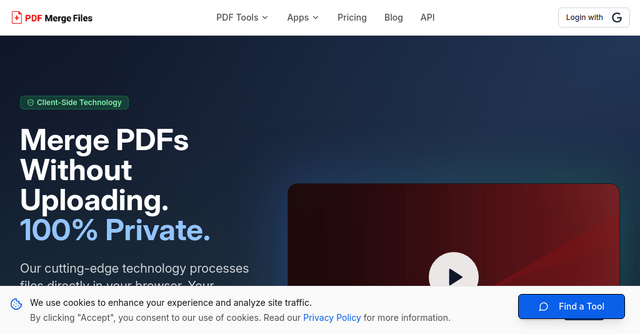
Why Your Business Needs a Lean PDF Workflow: A Review of PDF Merge Files
We’ve all been there: you’re ready to send a proposal to a client, but the document is scattered across five different files, the image is too large to email, or you need to extract just one page from a massive report. If you’re a solopreneur or an indie maker, your time is your most valuable asset. Spending thirty minutes struggling with clunky, outdated software or signing up for bloated, expensive subscriptions just to combine a few pages is a productivity killer.
That’s where PDF Merge Files comes in. It’s a clean, efficient, and browser-based solution designed for those of us who value speed and simplicity.
What is PDF Merge Files?
At its core, PDF Merge Files is a comprehensive SaaS platform built to handle the heavy lifting of document management. While the name suggests a simple utility for combining documents, it is actually a powerhouse suite containing over 100 professional tools.
Whether you are a freelancer merging project invoices, a developer organizing documentation, or a small business owner compressing heavy files for your website, this tool is designed to work as hard as you do. The best part? It’s entirely browser-based. There is no software to install, no registration hoops to jump through, and no cluttered interface to navigate. It does one thing exceptionally well: it gets your document tasks finished in seconds so you can get back to building your business.
Why Indie Makers Should Care About This SaaS Tool
As indie makers, we often fall into the trap of using "enterprise" software that feels like overkill. We end up paying for features we don't need or dealing with software that tracks every move we make. PDF Merge Files stands out in the SaaS landscape because it prioritizes the user experience—specifically, the experience of someone who just wants to get a job done.
Security and Privacy First
One of the biggest concerns with online document tools is data privacy. When you’re dealing with sensitive client data, contracts, or proprietary business plans, you don’t want your files sitting on a server somewhere. PDF Merge Files operates on a browser-based model, meaning your files don't have to travel far. It allows you to process your documents securely, giving you peace of mind that your data remains in your control.
Speed and Efficiency
When you are in the flow of work, switching contexts to manage a document can break your concentration. Because this platform is optimized for speed, you can drag, drop, and merge in seconds. It’s a low-friction tool that respects your time.
Key Features That Make a Difference
PDF Merge Files isn't just about sticking two pages together. It’s a full-featured document toolkit. Here is why the 100+ tools included actually matter for your daily workflow:
1. Seamless Merging and Splitting
This is the bread and butter of the platform. If you have multiple PDFs that need to become one, or a single PDF that needs to be broken down into individual chapters or sections, the interface makes it intuitive. You don’t need to be a tech expert to figure it out; the UI is designed to be self-explanatory.
2. Compression Capabilities
We’ve all had those moments where a PDF is just a few megabytes too large to attach to an email or upload to a client portal. The compression tools included in the suite allow you to reduce file size without sacrificing the quality of your documents. It’s a small detail, but it saves you from having to look for third-party file hosting services just to share a document.
3. Conversion and Organization
Beyond merging, the suite includes tools to convert files, edit document structures, and organize your digital workspace. Having 100+ tools in one place means you don’t need to bookmark five different websites to handle your documents. Whether you need to convert a format or rearrange pages, it’s all under one roof.
Practical Use Cases for Your Business
How can you integrate a tool like this into your daily routine? Here are a few scenarios where PDF Merge Files can save the day:
- The Freelance Proposal: You have a cover letter in a PDF, a project scope in another, and a portfolio in a third. Instead of sending three separate files, merge them into one professional, cohesive document for your client.
- The Documentation Cleanup: If you are building documentation for your own SaaS product, you likely have various screenshots and technical write-ups. Use the split and merge features to create clean, downloadable PDF manuals for your users.
- Client Onboarding: Combine your welcome packet, contract, and invoice into a single, easy-to-manage document for your new customers. It looks more professional and makes the onboarding process smoother.
- Large File Management: If you are archiving old project files, use the compression tool to shrink them down, saving space on your local drive or cloud storage without losing the necessary details.
Why It’s a Must-Have for Your Toolkit
In the world of SaaS, we are often sold on "complex" solutions. But the most effective tools are often the ones that are simple, reliable, and focused. PDF Merge Files doesn't try to be a project management suite or a CRM. It recognizes that document management is a specific pain point, and it solves that pain point efficiently.
For those of us working independently, keeping our software stack lean is crucial. By relying on a browser-based, no-registration-required tool, you reduce the clutter on your machine and the friction in your workflow. You don’t need to manage another subscription or remember another password. You just go to the site, do your work, and move on to the next task.
Final Thoughts
We are always on the lookout for tools that help indie makers stay productive without the bloat. PDF Merge Files hits that sweet spot of being a powerful, utility-focused SaaS that respects the user. Whether you’re merging a quick invoice or managing a large library of documents, it’s a reliable, fast, and secure way to handle your files.
If you’re tired of struggling with complicated document software, give this a try. It’s one of those rare tools that actually makes your workday easier rather than adding to your to-do list.
Ready to streamline your document management?
Head over to PDF Merge Files today and see how much time you can save by cleaning up your PDF workflow. It’s free, it’s secure, and it’s ready to use right now.