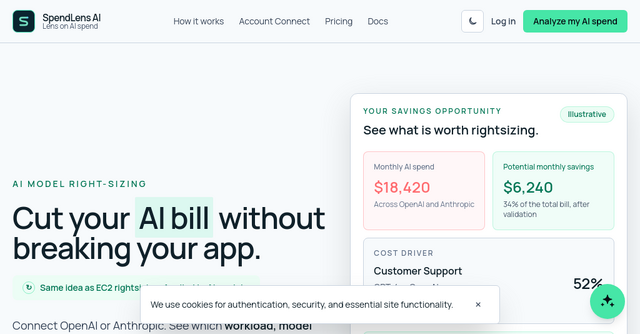
Stop Guessing Your AI Bill: A Practical Guide to LLM Cost Optimization
Your OpenAI or Anthropic monthly invoice arrives, and it’s a black box. You see a large, scary number, but you have no visibility into which feature, project, or API key is actually driving that spend. For indie makers and SaaS founders, this is a major pain point. When your AI costs start to scale, "cutting the bill" usually feels like a blind gamble—you’re terrified that switching to a cheaper model will break your app’s performance or destroy the user experience.
If you’ve been looking for a way to treat AI spend like server infrastructure—specifically, like EC2 rightsizing—you need to look at SpendLens AI. It is a privacy-first AI FinOps platform designed to help teams identify, validate, and optimize their LLM usage without the headache of infrastructure overhauls.
The Problem: Why Total Spend Isn't Enough
Most SaaS founders look at their provider dashboard and see a massive lump sum. They know they are spending $5,000 or $10,000 a month on AI, but they don't know if that cost is coming from their customer support chatbot, their internal data analysis tools, or a rogue experiment that never got turned off.
"A total is not an answer," as the team behind SpendLens AI puts it. To actually optimize, you need granular visibility. You need to know which specific workloads are the "cost drivers."
This is where SpendLens AI changes the game. By connecting your billing data, it breaks down your spending by project, feature, and model. It allows you to pinpoint exactly where your money is going so you can focus your engineering efforts on the 20% of your AI implementation that is likely causing 80% of your costs.
How SpendLens AI Works: Rightsizing for the AI Era
If you’ve ever managed cloud infrastructure, you’re familiar with the concept of "rightsizing"—adjusting instance types to match the actual performance needs of your workload. SpendLens AI applies this exact philosophy to your AI stack.
1. No Proxy, No Rewrite, No Latency
One of the biggest concerns for developers when adding cost-monitoring tools is the fear of adding a "man-in-the-middle" proxy. Nobody wants to introduce extra latency or a new point of failure in their production pipeline.
SpendLens AI is built for engineering reality. It does not act as a proxy or a gateway. Your application continues to call OpenAI and Anthropic directly, meaning there is zero impact on your request latency and no risk of gateway lock-in. You don't have to rewrite your application code to get started.
2. Compare Mode: Validate Before You Switch
The biggest fear when switching from a high-end model (like GPT-4o) to a more cost-efficient one is the drop in quality. SpendLens AI solves this with its "Compare Mode."
Instead of blindly migrating your production traffic, you can use SpendLens to run controlled tests. The platform finds the top three model candidates for your specific workload and allows you to run "candidate calls" in your staging environment.
The best part? You don't have to ship these tests to production. SpendLens evaluates the quality of the outputs using its own infrastructure—keeping your sensitive data safe—and provides a clear result. You get to see the cost-to-quality trade-off before you commit to a change.
Key Features for the Modern SaaS Founder
Why should you integrate this into your workflow? Here is why it matters for indie-built software products:
- Actionable Insights: You stop guessing. Instead of saying, "We need to lower our AI bill," you can say, "If we switch our customer support bot to a smaller model, we save 34% of our total monthly spend."
- Privacy-First Design: Privacy is non-negotiable for SaaS founders. SpendLens AI uses a redacted template and safe, generated data for its quality evaluations. Only aggregate results leave your application, ensuring your proprietary data stays yours.
- Fast Financial View: You can connect your provider data in under two minutes. You don't need a massive engineering team to start seeing where your money is going.
- Controlled Testing: The platform helps you rank candidate models based on cost, speed, and reliability. It turns a "gut feeling" migration into a data-driven decision.
Practical Scenarios: When to Use SpendLens AI
The "Scaling Too Fast" Scenario
Imagine you’re an indie maker whose SaaS just saw a massive spike in user sign-ups. Your AI costs are ballooning. You don't have time to manually audit every single API call. SpendLens AI can instantly show you that your "Product Search" feature is consuming 23% of your budget, while your "Customer Support" is consuming 52%. Now, you know exactly where to apply your optimization efforts first.
The "Quality vs. Cost" Dilemma
You’ve heard that a newer, smaller model is 90% cheaper, but you’re terrified your users will notice the drop in quality. By using SpendLens AI, you can run a side-by-side test. You might find that the cheaper model has a 96% pass rate compared to the expensive one. Suddenly, the choice to switch becomes an easy business decision rather than a high-stakes gamble.
Final Thoughts: Take Control of Your AI Spend
For many SaaS products, AI is the largest variable cost. If you don't manage it, it manages you. You don't have to sacrifice your user experience to save money, but you do need visibility.
SpendLens AI provides the tools to treat AI costs with the same rigor you treat your server bills. It is a must-have for any indie maker or SaaS founder who is serious about profitability and building a sustainable business.
Ready to see where your AI budget is actually going? Analyze your AI spend with SpendLens AI today and start finding those hidden savings without breaking your app.