How to Turn Any Image into a Minecraft Masterpiece: A Review of Minecraft Pixel Art
Building a massive, detailed mural in Minecraft is a rite of passage for many players, but it’s rarely as simple as it looks. If you’ve ever spent hours trying to eyeball a reference photo only to realize your proportions are off or your color palette is completely wrong, you know the frustration. You end up tearing down half the build, wasting resources, and losing your creative momentum.
That’s where Minecraft Pixel Art comes in. It’s a browser-based tool designed to bridge the gap between a creative vision and the practical reality of placing thousands of blocks in-game. Whether you are a casual builder looking to add some personality to your survival base or a dedicated creator planning massive map art, this tool takes the guesswork out of the process.
What is Minecraft Pixel Art?
At its core, this website is a specialized planning suite for Minecraft builders. It isn’t just a simple image converter; it’s a comprehensive workflow platform. It helps you move from an initial concept—whether that’s a JPG of your favorite landscape or a blank canvas in your head—to a concrete, block-by-block blueprint.
Because it runs entirely in your browser, you don’t need to worry about installing heavy desktop software, managing complex mods, or dealing with compatibility issues. It’s a lightweight, accessible utility that feels like it was built by someone who actually spends time building in the game.
Two Ways to Build: Blueprint Mode vs. Draw Mode
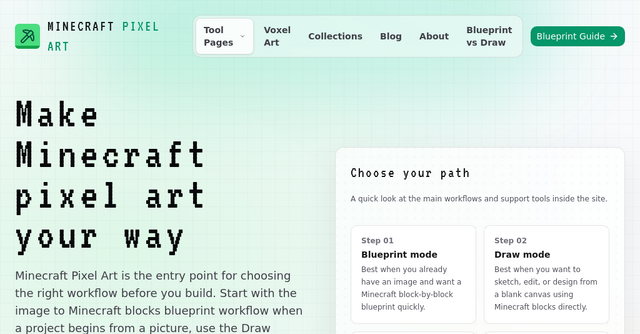
One of the standout features of Minecraft Pixel Art is its flexibility. It recognizes that not every project starts the same way, offering two distinct paths to get your build started.
The Blueprint Workflow (Image-to-Blocks)
If you have a specific image you want to recreate, Blueprint mode is your primary tool. You upload your PNG or JPG files, and the tool handles the heavy lifting of converting pixels into Minecraft blocks.
This is perfect for:
- Recreating logos or signs for a server hub.
- Turning portraits into wall art for your base.
- Translating complex digital art into a format that uses actual in-game materials.
The Draw Mode (Blank Canvas)
Sometimes, you don’t want to convert an existing photo; you want to design something from scratch. Draw mode provides a blank canvas where you can manually place, edit, and refine your design. This is ideal for those who want full creative control, allowing you to iterate on your build pixel by pixel without the constraints of an imported image.
The best part? You can start with a generated blueprint in Blueprint mode and then switch over to the Draw tab to add those final, manual touches. This hybrid capability gives you the best of both worlds: the speed of automation and the precision of manual artistry.
Why This Tool is a Game-Changer for Builders
Beyond the basic conversion features, Minecraft Pixel Art includes a suite of planning tools that solve the "logistics" side of building. Anyone who has played in Survival mode knows that gathering materials is half the battle.
Practical Material Planning
Before you place a single block, you need to know what you’re getting into. The tool provides:
- Block Counts: Get an accurate assessment of how many blocks you’ll need for your project.
- Shopping Lists: It even breaks requirements down into "stacks," making it easy to calculate exactly how many chests of materials you need to grind for.
- Palette Filters: You can curate your own color palettes to ensure your build looks exactly how you want it to, even when working with the specific textures available in Minecraft.
Seamless Mobile Integration
One of the most thoughtful features is the mobile-friendly viewer. You can generate a QR code for your project, scan it with your phone, and keep your blueprint open on a second screen while you build in-game. This eliminates the need to constantly Alt-Tab between your game and your browser, keeping your workflow fluid and uninterrupted.
Exporting for Advanced Workflows
For more technical builders, the Minecraft Pixel Art website supports .nbt file exports. This is a massive time-saver for anyone using tools like Litematica, as it allows you to import your structure directly into the game. It’s a professional-grade feature tucked into a very accessible web interface.
Choosing the Right Workflow for Your Project
If you are new to the platform, it’s easy to get overwhelmed by the options. The secret is to start with the Minecraft Pixel Art homepage as your "workflow router."
- Define your starting point: Are you working from an existing image, or are you designing from your imagination?
- Plan your palette: Use the texture and palette browsing tools to narrow down your material choices. This prevents the "too many blocks" trap where your build ends up looking noisy or inconsistent.
- Refine the details: Use the layering and preview controls to ensure the build is structurally sound and visually pleasing.
- Verify and gather: Double-check your shopping list and block counts to ensure your survival run doesn't hit a wall halfway through construction.
- Export or Share: Once you are ready, use the QR code for mobile viewing or the
.nbtexport for automated building.
Final Thoughts
In a space often cluttered with complicated, outdated, or bloated software, this website stands out for its clarity and focus. It respects the user's time by providing exactly what is needed to get from a "what if" to a "look what I built."
Whether you’re a solo builder looking to add a personal touch to your survival world or a community manager planning an epic server spawn, Minecraft Pixel Art provides the structure and guidance to make it happen. It’s a clean, efficient, and highly practical tool that belongs in every Minecraft creator’s bookmarks.
Ready to start your next project? Head over to Minecraft Pixel Art and choose your path—your next masterpiece is just a few clicks away.