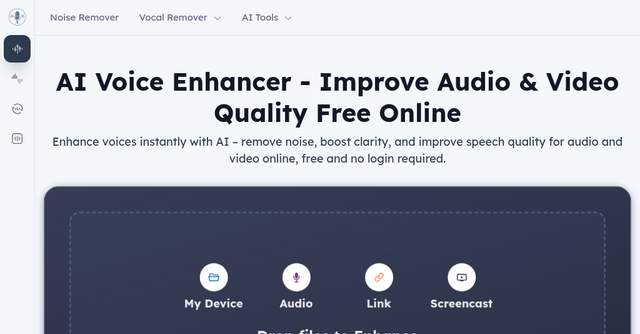
From Muddy Audio to Studio Quality: A Closer Look at AI Voice Enhancer Free
We’ve all been there. You’ve spent hours recording the perfect podcast episode, filming a high-stakes tutorial for your SaaS product, or capturing an important interview, only to get back to your desk and realize the audio is... well, unusable. Between the hum of the air conditioner, the distant traffic, or just a low-quality microphone, "good enough" often turns into "distracting."
Usually, the solution involves expensive audio engineering software, a steep learning curve, and hours of tedious manual editing. But for indie makers and solopreneurs who need to ship fast, that’s a luxury we don’t have.
Enter AI Voice Enhancer Free. This is one of those rare "Others" category tools that actually delivers on its promise without forcing you to jump through hoops. It’s a browser-based, AI-powered utility designed to strip away the noise and polish your recordings in seconds.
What Is AI Voice Enhancer Free?
At its core, AI Voice Enhancer Free is an online engine designed to handle the heavy lifting of audio post-production. It’s not just a simple noise gate; it uses advanced AI models to actually distinguish between your speech and the clutter occupying the rest of the frequency spectrum.
The best part? It’s completely free, requires no login, and works directly in your browser. Whether you’re dealing with a shaky MP3 or a professional video file, you can drag, drop, and export a cleaner version of your content without installing heavy software like Audacity or Adobe Audition.
Why This Tool is a Game Changer for Indie Makers
As a solopreneur, your time is your most valuable asset. Every minute spent "cleaning up" audio is a minute you aren't building, marketing, or iterating on your product. Here is why this tool stands out:
1. Zero Friction Workflow
Most audio tools require you to create an account, verify your email, and perhaps even pay a subscription fee before you can even touch a file. This tool flips that model. It’s built for speed—you land on the page, upload your file, and get your result. For someone who just needs to fix one clip for a social media update or a quick Loom video, this is invaluable.
2. Deep AI-Powered Processing
The platform offers different models, including the "AlphaAudioCleaner Model V2," which is specifically trained on massive datasets to handle complex noise environments. This isn't just basic filtering; it’s adaptive AI that understands the nuance of human speech, helping to restore natural vocal tones while suppressing the background chaos.
3. Broad Compatibility
You don’t have to worry about converting your files to a specific format first. The tool supports over 20 common formats, including MP4, MP3, WAV, MKV, and more. Whether you’re processing a raw screencast from your desktop or a voice memo from your phone, it’s likely supported.
Key Features That Actually Matter
When you dive into the tool, you’ll find a suite of features that go beyond simple background noise removal. Here’s why these specific functions are helpful for indie creators:
Intelligent Noise Removal
This is the bread and butter of the platform. It automatically detects and kills unwanted background hums, fan noise, and static. It’s the difference between a video that feels "amateur" and one that feels "produced."
Advanced Cleanup Options
Beyond just "noise," the tool allows you to target specific problems:
- Mute Segments & Silence Removal: Perfect for tightening up long pauses in podcasts or tutorials.
- Stutter and Filler Word Removal: If you’re not a professional voice actor, we all say "um" and "uh." This helps clean up the pacing of your speech.
- Studio Sound & Reverb Removal: If you recorded in a room with bad acoustics, the "Remove Reverb" feature can help bring the sound back into your "studio" space.
Use Cases: Who Should Use This?
You don’t need to be an audio engineer to make this tool work for you. In fact, it was built specifically for the rest of us:
- YouTubers & Video Creators: If you’re filming tutorials or vlogs, the audio is actually more important than the video quality. Viewers will forgive a lower resolution, but they will click away if the audio is grating. This tool ensures your dialogue stays front and center.
- Podcasters: Whether you’re a hobbyist or running a business podcast, the AI Voice Enhancer Free helps you achieve that "broadcast" quality without needing a $500 microphone or a soundproof room.
- Educators & Course Creators: If you are building an online course, your students need to hear you clearly. Removing breath sounds and background distractions makes your content significantly more engaging and professional.
- Marketing Producers: Need to boost the clarity of a testimonial or a quick social media ad? A quick pass through this tool can make your marketing assets sound like they had a production budget behind them.
How to Get Started (It Really is This Simple)
- Upload: Head over to the website and drop your file. There is a 3-hour max duration and a 10GB limit, which is more than enough for almost any project.
- Enhance: Let the AI do its work. You can choose between different models based on how complex your audio environment is.
- Download: Preview the result directly in the browser and download it once you’re satisfied.
Final Thoughts: A Tool You’ll Keep in Your Bookmark Folder
In the indie space, we are constantly bombarded with SaaS tools that promise to solve everything. Often, they are bloated and expensive. AI Voice Enhancer Free is a refreshing departure from that. It does one thing, it does it well, and it doesn't try to lock you into a ecosystem you don't need.
If you find yourself frequently struggling with "noisy" content, bookmark this site. It’s a low-effort, high-impact tool that will instantly elevate the professionalism of your digital footprint.
Ready to clean up your audio? Give it a try today at voiceenhancer.ai and see the difference for yourself.