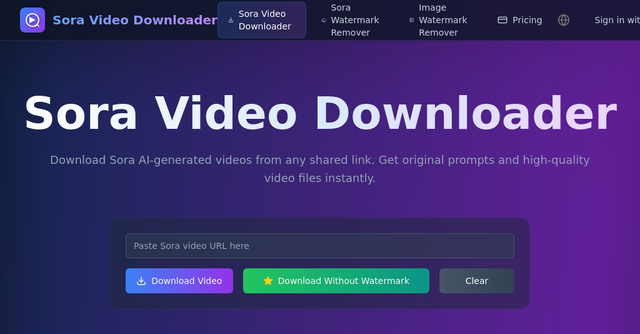
How to Download Sora AI Videos: A Deep Dive into Sora Video Downloader
The landscape of generative AI is moving at a breakneck pace. One moment we are experimenting with static images, and the next, we are watching hyper-realistic, physics-defying videos generated by OpenAI’s Sora. As creators and indie makers, the ability to study, curate, and draw inspiration from these high-quality AI-generated clips is invaluable. However, there is a common friction point: the official Sora platform is a "walled garden," making it notoriously difficult to save the content you find inspiring or to reverse-engineer the prompts behind the magic.
This is where Sora Video Downloader comes into play. If you have ever found yourself staring at a brilliant piece of AI cinema only to realize the official platform offers no straightforward way to save it to your local machine, this tool is the missing piece in your workflow.
What is Sora Video Downloader?
Sora Video Downloader is a dedicated web-based tool designed to bridge the gap between OpenAI’s restrictive platform and your creative needs. As a browser-based utility, it allows users to take any publicly shared link from the Sora app and convert it into a high-quality, local video file.
For indie makers and SaaS enthusiasts, this tool is more than just a downloader—it is an educational resource. By allowing you to access original prompts alongside the video files, it helps you understand the specific nuances of prompt engineering that lead to high-fidelity AI outputs.
Why Indie Makers Need This Tool
When you are building a product or curating content for a brand, speed and accessibility are everything. The official Sora platform, while sophisticated, suffers from a few key limitations that can stifle your creative process:
- Restrictive Download Policies: The official platform often limits downloads to your own content. If you find a public video that perfectly demonstrates a concept you want to study, you are often left without a way to save it.
- Complex UI: Navigating official platforms can be clunky, especially when you are trying to grab assets quickly.
- Lack of Prompt Transparency: Understanding how a specific video was generated—the "recipe" behind the output—is often hidden.
Sora Video Downloader solves these issues by providing a streamlined, no-nonsense interface that respects your time and your need for high-quality assets.
Core Features That Matter
1. High-Fidelity Output
Quality is non-negotiable in the world of AI video. This tool ensures that you download Sora videos in their original quality, without the compression artifacts that often plague screen-recorded captures. When you are analyzing movement, lighting, and texture in AI clips, having the source file is essential.
2. Prompt Extraction
Perhaps the most valuable feature for any AI enthusiast is the ability to view and copy the original prompts. By seeing exactly how a video was prompted, you can iterate on your own designs, learn from the community’s successes, and refine your own AI generation strategy.
3. Completely Free and Unlimited
In an era where every utility seems to hide behind a paywall or a subscription model, this tool stands out by being 100% free. There are no hidden fees or usage caps to worry about. Whether you are downloading one video for research or a dozen for a mood board, the service remains accessible.
4. Privacy-First Approach
As indie makers, we are often wary of tools that scrape our data. The developers behind this website have prioritized privacy, ensuring that they do not store your data or track your downloads. It is a secure, anonymous way to manage your AI video library.
How to Use the Tool
The process is designed to be as frictionless as possible. You don’t need to be a tech expert to use it. Here is the step-by-step workflow:
- Browse the Source: Use the Sora app to find the video you want to save.
- Copy the Link: Tap the 'More' button (the three dots) on the video menu and select 'Copy Link'.
- Paste and Convert: Head over to Sora Video Downloader and paste your link into the input field.
- Download and Analyze: Click the download button. Within seconds, you will have the video file ready for your project and the original prompt ready for your reference.
Practical Use Cases for Your Business
How can you actually apply this to your daily workflow?
- Competitive Research: If you are building a competitor or a complementary tool in the AI space, analyzing how others utilize the Sora platform can give you insights into user behavior and creative trends.
- Content Curation: If you run a social media account or a newsletter focused on AI, having a repository of high-quality clips is essential. This tool makes building that library fast and efficient.
- Prompt Engineering Workshops: If you are teaching others about AI, showing a video alongside its exact prompt is the most effective way to demonstrate the power of well-crafted instructions.
Frequently Asked Questions
Is this tool affiliated with OpenAI?
No, this is an independent tool. It is not affiliated with OpenAI or the official Sora team. It acts as an external utility to help users manage their content more effectively.
What about video formats?
The tool supports MP4, which is the industry standard for AI-generated content. This ensures compatibility with almost any video editor or playback device you use.
Does it work on mobile?
Yes. The website is fully responsive, meaning you can grab video links and download them directly from your phone while on the go.
Is it really free?
Yes. There are no subscriptions, hidden limits, or pay-per-download schemes.
Final Thoughts
As the AI video space continues to evolve, having the right tools to capture and study the latest breakthroughs is vital. Sora Video Downloader provides a simple, reliable, and privacy-focused way to keep up with the rapid pace of innovation. Whether you are a solo founder experimenting with new marketing tactics or a developer looking to understand the underlying mechanics of AI video generation, this website is a must-bookmark utility.
Stop struggling with the limitations of the official platform and start building your own library of AI inspiration today. Head over to Sora Video Downloader to get started.