Stop Retyping: How NoteThisDown Bridges the Gap Between Analog and Digital
There is a specific kind of cognitive magic that happens when pen hits paper. Whether you’re sketching out a product roadmap, jotting down lecture notes, or brainstorming your next big business pivot, handwriting feels more intentional than typing. But for the modern professional or indie maker, that magic usually comes with a tax: the dreaded post-meeting retyping session.
We live in a digital-first world where tools like Notion have become the "second brain" for our businesses. If your notes aren't in your workspace, they might as well not exist. For years, the choice has been binary: sacrifice the clarity of digital searchability for the creative freedom of a notebook, or suffer through the tedious manual labor of transcribing your own handwriting.
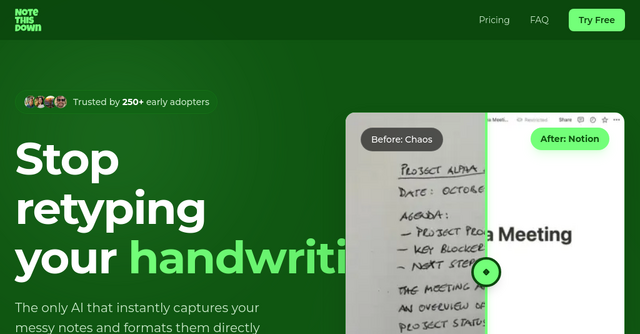
Enter NoteThisDown. This SaaS tool is designed to solve the friction between your physical notebook and your digital workspace, turning handwritten scrawls into structured, searchable Notion pages in under 30 seconds.
What is NoteThisDown?
At its core, NoteThisDown is an AI-powered bridge. It’s a specialized SaaS platform built for the "analog-at-heart, digital-by-necessity" crowd. Instead of forcing you to use a tablet or a stylus, it lets you stick to your favorite fountain pen or ballpoint. You snap a photo of your page, the AI processes the handwriting, and it automatically formats the content into a new page within your Notion workspace.
It’s not just an OCR (Optical Character Recognition) tool that spits out a wall of unformatted text. It’s an integration layer that understands the context of your notes, ensuring that when you open Notion, your data is already organized with dates, tags, and the original image attached for reference.
Why Indie Makers and Professionals Need This
If you are a solopreneur or an indie maker, your time is your most expensive resource. Every hour spent manually transferring meeting action items or lecture summaries from a notebook to your project management tool is an hour you aren't building, shipping, or selling.
NoteThisDown isn't just a utility; it’s a productivity multiplier. By automating the data entry process, it allows you to maintain the creative benefits of handwriting without the administrative bottleneck that usually follows.
Key Features That Matter
Native Notion Integration
Most transcription apps stop at the text. They give you a clipboard full of words that you then have to copy, paste, and reformat. NoteThisDown treats Notion as a first-class citizen. It creates a beautifully formatted page in your chosen database, complete with date properties and the original image attached. This means your notes are immediately searchable and linkable to your existing tasks and projects.
AI-Powered Handwriting Recognition
We’ve all seen "smart" tools fail the moment a user has less-than-perfect penmanship. The AI model behind NoteThisDown has been trained on millions of samples, covering everything from messy cursive and faded ink to the "doctor’s handwriting" style that most of us fall into when we’re writing quickly during a brainstorm. It’s designed to handle the reality of how people actually write, not how they write when they're being graded.
Multi-page Scanning
Rarely is a great idea contained to a single page. Whether you’re mapping out a complex software architecture or taking a long-form interview, you often need to capture multiple sheets. The platform supports batch uploading, allowing you to scan up to 10 photos at once and compile them into one cohesive, organized document in your workspace.
A True "Anywhere" Workflow
NoteThisDown functions as a Progressive Web App (PWA). You can add it to your phone’s home screen, making it feel like a native app. When you’re in a coffee shop, an airport, or a client meeting, you don’t need to boot up a laptop or fiddle with complex settings. Just snap, sync, and get back to the conversation.
Practical Use Cases for Your Workflow
How does this actually look in practice? Here are a few ways users are leveraging the tool:
- The Meeting Recapper: As a consultant or product manager, you’re likely in meetings all day. Instead of typing while trying to maintain eye contact, you can focus on the discussion. After the meeting, NoteThisDown sweeps your handwritten action items directly into your Notion "Meetings" database.
- The Student/Researcher: If you’re a student, you know the value of handwriting for memory retention. But during exam season, you need those notes to be searchable. You can snap your lecture notes, and they instantly become a part of your digital study guide.
- The Brainstormer: When you’re in the "messy" phase of building a product, you need to sketch. NoteThisDown captures those sketches and the accompanying notes, ensuring that your initial concepts aren't lost in a physical notebook that gets buried on a shelf.
Security and Privacy: A Priority
In an era where data privacy is paramount, it’s worth noting how NoteThisDown handles your information. The team behind the product has prioritized security from the jump. They do not store your content after the transcription process is complete. The notes move from your device through their AI and directly into your private Notion workspace. Being GDPR compliant and hosted on EU servers provides that extra layer of confidence for professionals handling sensitive client or project data.
Pricing: Simple and Transparent
One of the most refreshing aspects of NoteThisDown is its pricing model. In a landscape filled with "freemium" models that gate off essential features like multi-page scanning or priority support, this tool keeps it simple.
They offer one flat-rate plan with no feature gates. Whether you pay monthly (€8/month) or annually (€64/year, effectively €5.33/mo), you get the full suite of tools: unlimited transcriptions, multi-page scanning, and the Notion integration. It’s a transparent approach that assumes you’re a professional who wants a tool that just works, without needing to upgrade to a "Pro" tier to unlock basic functionality.
Final Thoughts: Is It Right for You?
If you’ve ever felt the guilt of having a notebook full of brilliant ideas that you never actually digitized, NoteThisDown is the solution you’ve been waiting for. It respects the analog process while embracing the digital reality of our workflows.
The 7-day free trial is a low-risk way to see if it fits your specific handwriting style and organizational habits. If you’re looking to stop wasting time on manual data entry and want to focus more on the "making" part of being an indie maker, give it a try.
Your handwritten notes deserve a permanent, searchable home. Stop retyping, and start syncing.
Ready to streamline your notes? Start your 7-day free trial of NoteThisDown today.