Stop Dragging Your Windows: A Deep Dive into SnapToWindow
Nothing kills a flow state faster than spending ten seconds manually resizing a browser window to fit perfectly next to your code editor. If you are an indie maker or a developer, your screen is your primary workspace. When your digital environment is cluttered, your focus follows.
For years, macOS users have relied on tools like Rectangle to keep their workspaces organized. But for those of us working across different operating systems—or strictly within a Windows environment—finding a lightweight, high-performance solution that doesn't eat up your RAM has been a consistent challenge.
Enter SnapToWindow. This window management tool is designed for the keyboard-first power user who wants native performance without the bloat of heavy, resource-hungry software.
What is SnapToWindow?
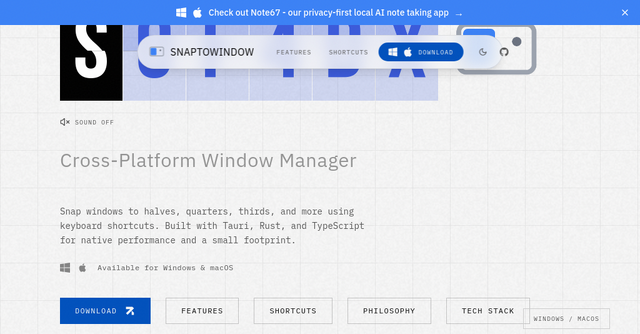
At its core, SnapToWindow is a cross-platform window management utility that allows you to snap windows to halves, quarters, thirds, and more using customizable keyboard shortcuts.
Built using the Tauri framework with Rust and TypeScript, it represents the modern shift in software development: creating tools that feel native to the operating system while maintaining a tiny footprint. Whether you are a solopreneur juggling a dozen browser tabs, a designer managing multiple assets, or a developer with a complex IDE setup, this SaaS tool is built to streamline your workflow.
Why Performance Matters for Indie Makers
As indie makers, we are often running multiple resource-intensive applications simultaneously. Between Docker containers, IDEs, local servers, and browser-based SaaS dashboards, our system memory is precious.
Many window managers are built on Electron, which can lead to significant memory usage just to handle simple window positioning. SnapToWindow takes a different approach. By leveraging Rust and the Tauri framework, the developer has prioritized a small footprint. It runs quietly in the system tray, waiting for your commands without dragging down your system’s performance. It’s the kind of utility you install once, configure to your liking, and then forget it’s even running—exactly how a good productivity tool should function.
Key Features That Change Your Workflow
The beauty of SnapToWindow lies in its simplicity and its adherence to the "keyboard-first" philosophy. Here is why the feature set stands out for power users:
Precision Window Snapping
Most native operating system snapping features are basic—usually just half-screen or quarter-screen. SnapToWindow goes further by allowing for thirds, two-thirds, and center-snapping. This is incredibly useful for those who use ultra-wide monitors or who need to keep a reference window (like documentation or a design file) in a smaller, fixed position while working in a primary window.
Customizable Keyboard Shortcuts
The tool comes pre-configured with intuitive hotkeys, but the real power is in the customization. Because the shortcuts are configurable, you can map them to whatever feels most natural for your muscle memory. Whether you prefer Ctrl+Alt on Windows or Control+Option on macOS, the consistency across platforms means you aren't relearning your workflow every time you switch machines.
Multi-Monitor Support
For those of us working with a dual or triple-monitor setup, window management can become a headache. SnapToWindow includes full multi-monitor support, ensuring that when you trigger a shortcut, the window snaps to the display you intend it to. This consistency is a major time-saver when you are constantly shifting tasks between different screens.
Quiet System Tray Integration
We’ve all experienced "app fatigue," where the taskbar is cluttered with icons that don't need to be seen. SnapToWindow runs in the background as a system tray icon. It stays out of your way, doesn't demand your attention, and ensures that your OS environment stays clean.
Practical Use Cases for Solopreneurs
How exactly does this fit into your day-to-day business operations? Here are a few scenarios where SnapToWindow shines:
- The Research & Documentation Workflow: When you are building a new feature, you likely have your IDE on one side of the screen and documentation or a stack overflow thread on the other. With one keystroke, you can snap your IDE to the left two-thirds and your documentation to the right third, giving you the perfect layout for deep work.
- The SaaS Sales & Support Sprint: If you are handling customer support tickets or demos, you might have your ticketing system in one window and your product dashboard in another. Being able to instantly maximize or snap windows to halves allows you to switch contexts rapidly without the mouse-dragging friction.
- The Multi-Monitor Dev Setup: If you are a developer, you know the frustration of opening a new window on the wrong monitor. SnapToWindow allows you to move and resize windows across any connected display with a single, reliable keyboard command, keeping your focus on the code rather than the window management.
The Open Source Philosophy
One aspect that will appeal to the indie community is that SnapToWindow is open source and MIT licensed. In an era where many SaaS tools are moving toward closed-source, subscription-heavy models, having an open-source alternative for a fundamental OS utility is refreshing.
It also speaks to the quality of the build. Because it is built with Rust and Tauri, the codebase is approachable for those who want to understand how it works under the hood or contribute to its development. The project’s commitment to "keyboard-first" design, combined with its open-source nature, makes it a tool that respects the user's autonomy.
Getting Started
If you are tired of the "clutter-drag-resize" loop, it is time to upgrade your window management.
- Download: Head over to the official SnapToWindow website to grab the latest version for your OS.
- Configure: Spend five minutes mapping your favorite shortcuts. I recommend starting with the basics—halves and thirds—and building up from there.
- Integrate: Let it run in your system tray. Once you get used to snapping windows with your keyboard, you will find it nearly impossible to go back to using your mouse for window management.
For indie makers and SaaS builders, time is the only currency that matters. Tools like SnapToWindow don't just organize your screen; they buy you back the seconds and minutes you lose to repetitive manual tasks. By reducing friction in your workspace, you are clearing the path for more focused, productive output.
Give it a try and see how much cleaner your development environment looks when everything finally snaps into place.