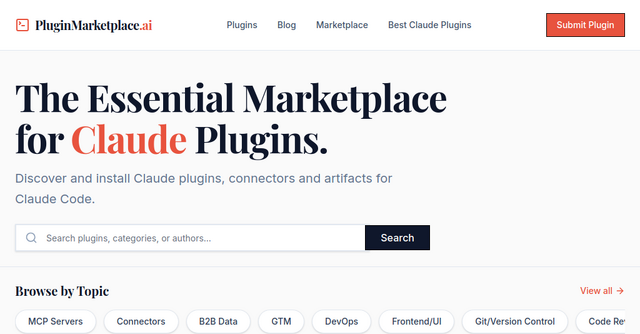
Supercharge Your Workflow: A Look at the Claude Plugin Marketplace
If you’ve spent any time working with Claude Code recently, you know the feeling: you’re deep in a coding session, the AI is humming along, but you keep hitting those small, repetitive friction points. Maybe it’s the need to manually format an API integration, or perhaps you’re tired of setting up the same boilerplate artifacts over and over again. You have the power of AI at your fingertips, yet you’re still spending too much time "managing" the tools rather than building the product.
This is the exact problem the Claude Plugin Marketplace was built to solve. It’s a dedicated hub for indie makers and developers who want to stop reinventing the wheel and start shipping faster.
What is the Claude Plugin Marketplace?
At its core, the Claude Plugin Marketplace is a centralized, curated website that acts as the primary directory for Claude Code extensions. Think of it as the app store for your AI coding assistant. Whether you are looking for advanced connectors, pre-defined artifacts, specialized skills, or templates, this platform serves as the bridge between your current workflow and a fully optimized development environment.
For indie makers and solopreneurs, your biggest asset is time. By leveraging tools found in this directory, you can automate those manual tasks that eat into your development cycle, allowing you to focus on the high-level logic that actually grows your SaaS.
Why Your AI Coding Workflow Needs Plugins
It is easy to think of Claude Code as a standalone tool, but its real power is unlocked through customization. The Claude Plugin Marketplace provides the infrastructure to turn a general-purpose AI into a specialized teammate.
1. Advanced Connectors
Integrations are often the most tedious part of building a new feature. Instead of digging through documentation and writing custom scripts to link your AI agent to a specific API or database, you can browse the marketplace for pre-built connectors. These are designed to plug directly into your workflow, saving you hours of debugging and configuration time.
2. Pre-defined Artifacts
If you frequently build specific UI components or structural patterns, you know how repetitive it can be to prompt Claude to "build this exactly like I did last time." Marketplace artifacts provide a shortcut. You can deploy battle-tested templates that ensure consistency across your codebase without having to explain the context from scratch every single time.
3. Specialized Skills and Templates
The marketplace isn't just about utility; it’s about expertise. You can find plugins that inject specific domain knowledge or coding styles into your AI assistant. Whether you’re developing complex agents or just need a templated starting point for a new SaaS module, these plugins help you maintain a high standard of code quality with minimal effort.
Practical Use Cases for Indie Makers
How does this actually look in practice? Let’s imagine a few scenarios where a developer might turn to this Website category:
- The Rapid Prototyper: You have an idea for a new feature and need to spin up a UI in minutes. You head to the marketplace, grab a pre-defined artifact for your specific frontend framework, and Claude Code instantly understands the design language you’re aiming for.
- The API Integrator: You’re building a tool that connects to a third-party service (like Stripe or Twilio). Instead of writing the connection logic from scratch, you search the marketplace for a connector. You install it, deploy it, and suddenly your AI agent knows exactly how to interact with those endpoints.
- The Workflow Optimizer: You notice you spend 20 minutes every morning setting up your project environment. You find a template plugin that automates your folder structures, linting configurations, and initial dependency installs, turning a 20-minute chore into a one-click deployment.
A Growing Ecosystem for Developers
One of the most exciting aspects of this platform is that it isn't just a static list of tools. It is an evolving ecosystem. With over 114 plugins already available and thousands of installs recorded, the community is actively building and sharing solutions to the exact problems you’re facing.
For those of you who enjoy building tools as much as using them, the marketplace also offers a path to get discovered. If you’ve written a custom script or built a connector that solved a niche problem for your own project, you can submit it to the marketplace. It’s a great way to contribute to the AI coding community, build your reputation as a developer, and help thousands of other Claude Code users overcome the same hurdles you did.
How to Get Started
If you’re looking to streamline your development process, the best approach is to start small. Head over to the Claude Plugin Marketplace and browse the 19 different categories. Don’t try to overhaul your entire workflow in one day. Instead, identify one task that always annoys you—that one thing you hate doing every time you start a new branch—and see if there’s a plugin that can handle it for you.
By offloading the repetitive "grunt work" to these community-vetted extensions, you’re not just saving time. You’re giving yourself the mental bandwidth to focus on what really matters: building, shipping, and scaling your business.
Ready to see what’s available? Head over to the Claude Plugin Marketplace today and see how you can upgrade your AI coding assistant. Whether you’re looking to find the next great tool to save you time or you’re ready to share your own creations with the world, it’s the place to be for the modern indie developer.