Stop Wrestling with PDF Libraries: How TemplateFox Simplifies Document Automation
If you’ve ever spent an entire weekend fighting with CSS-to-PDF converters, wrestling with page breaks that refuse to cooperate, or manually hacking together invoices in code, you know the pain. For most indie hackers and SaaS founders, document generation is a necessary evil—it’s not the core of your product, but it’s critical for your customers.
When you’re trying to ship features and scale your business, the last thing you want to do is spend hours debugging why a table row is cutting off on page two. You need a reliable, professional way to generate documents without becoming a full-time PDF engineer.
Enter TemplateFox. It’s a SaaS tool designed to bridge the gap between "I need a professional document" and "I don't have time to write custom rendering logic."
What is TemplateFox?
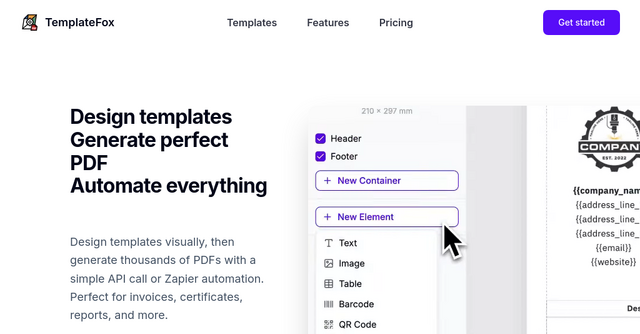
At its core, TemplateFox is a visual PDF generation engine. It replaces the tedious process of writing HTML and CSS from scratch with a drag-and-drop editor. Once your design is ready, you connect it to your application via a simple API call or a no-code automation platform like Zapier or Make.
Whether you're building a side project that needs to send automated receipts or a complex SaaS platform requiring dynamic certificate generation, TemplateFox handles the heavy lifting. It’s built for developers who want to ship faster and business owners who need to automate their back-office workflows without writing a single line of code.
Why Indie Makers are Switching to TemplateFox
For many of us in the indie space, our time is our most valuable asset. Here is why this tool is becoming a go-to solution for document automation.
1. Visual Design vs. Code-Heavy Rendering
Most traditional PDF libraries require you to write complex HTML/CSS, which is notoriously difficult to get right in PDF format. TemplateFox gives you a WYSIWYG editor. You drag, drop, and resize elements just like you would in a design tool. You see exactly what you’re going to get before you ever send a production API call.
2. Tables That Actually Work
If you’ve ever tried to generate an invoice with a variable number of line items, you know that dynamic height is a nightmare. TemplateFox handles tables natively. They grow with your data, spanning multiple pages automatically if your list of items is long. It’s a small detail, but it’s the difference between a professional-looking invoice and a broken document.
3. Dynamic Data Binding and Logic
It’s not just about static templates. You can inject dynamic data into your documents effortlessly. Even better, the platform includes built-in functions to handle things like date formatting, mathematical calculations (perfect for totals and tax), and rounding. You can even use system variables like page numbers and timestamps, so your documents look polished right out of the box.
4. No-Code Integrations
You don’t have to be a backend developer to use this SaaS. If you’re using Airtable, Zapier, or Make to run your business, you can trigger a PDF generation event without writing a custom backend script. This is a game-changer for solopreneurs who want to automate their shipping labels or packing slips without building a dedicated server.
Real-World Use Cases for Your Business
Where does this fit into your current tech stack? Here are a few scenarios where TemplateFox shines:
- E-commerce and SaaS Invoicing: Automatically generate and email professional, branded invoices the moment a payment hits your Stripe account.
- Certificate Generation: If you run a course or a community, you can automatically trigger a PDF certificate of achievement whenever a user completes a module.
- Logistics and Operations: Generate clean, scannable packing slips or shipping labels with built-in barcode and QR code support.
- Reporting: Create detailed, data-driven reports for your users by passing JSON data to your template and letting the API handle the layout.
Built for Speed and Scalability
One of the biggest concerns for developers is latency. When a customer clicks "Download Invoice," they don't want to wait ten seconds for a server to spin up. TemplateFox is optimized for speed, typically returning results in 1-3 seconds.
With 99.997% uptime over the last 90 days and over 50k PDFs rendered, it’s a battle-tested infrastructure. Whether you are sending a handful of documents a month or thousands, the system is designed to scale with your growth.
How to Get Started
The best part about TemplateFox is the barrier to entry. You don’t need to enter a credit card to start experimenting. They offer a generous free tier (100 PDFs/month), which is perfect for testing your ideas or running a small-scale product.
If you’re a developer, you’ll appreciate the SDKs available for major languages like TypeScript, Python, Go, PHP, Ruby, Java, and C#. If you’re more of a no-code builder, their documentation will walk you through setting up a Zapier webhook in minutes.
Final Thoughts
Stop building your own PDF engine. It’s a distraction from the features your customers are actually paying for. By outsourcing your document generation to a dedicated SaaS tool, you save yourself the headache of maintenance and ensure your business documents look professional and consistent every single time.
Ready to automate your paperwork? Head over to TemplateFox and start building your first template today. You’ll be surprised at how much time you save once you stop coding your layouts by hand.